> ## Documentation Index
> Fetch the complete documentation index at: https://docs.langtrace.ai/llms.txt
> Use this file to discover all available pages before exploring further.
# Manage Prompts
> Langtrace lets you store and version prompts, making it easy to manage and reuse them across your applications.
## How to create and version prompts
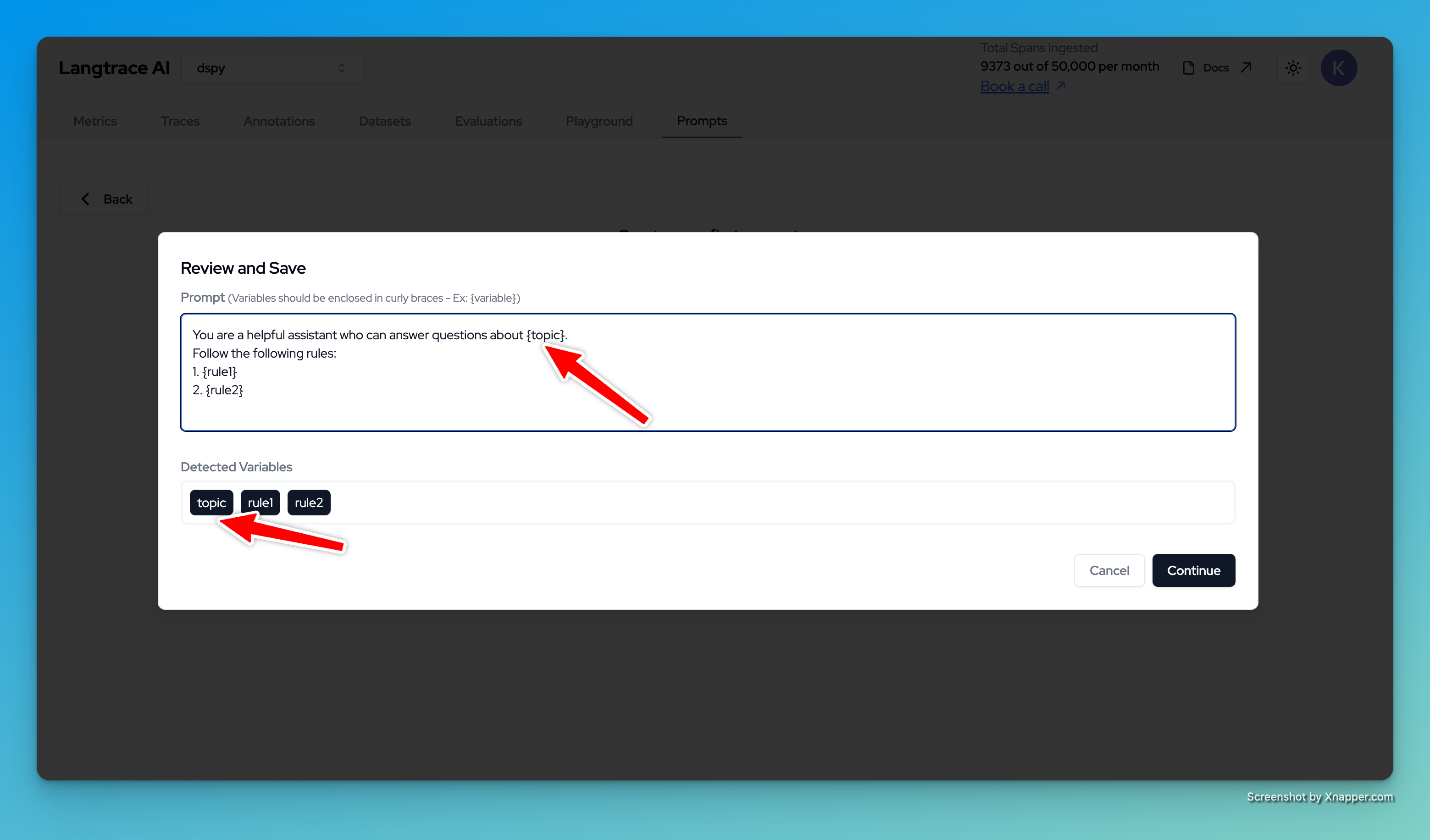
Step 1: Create a new project in Langtrace and go to the Prompts tab. Click on the "Create Prompt" button to create a new prompt.
You can define variables like `${name}` and `${version}` in your prompt. These variables can be dynamically filled in when you use the prompt in your application using the SDK.
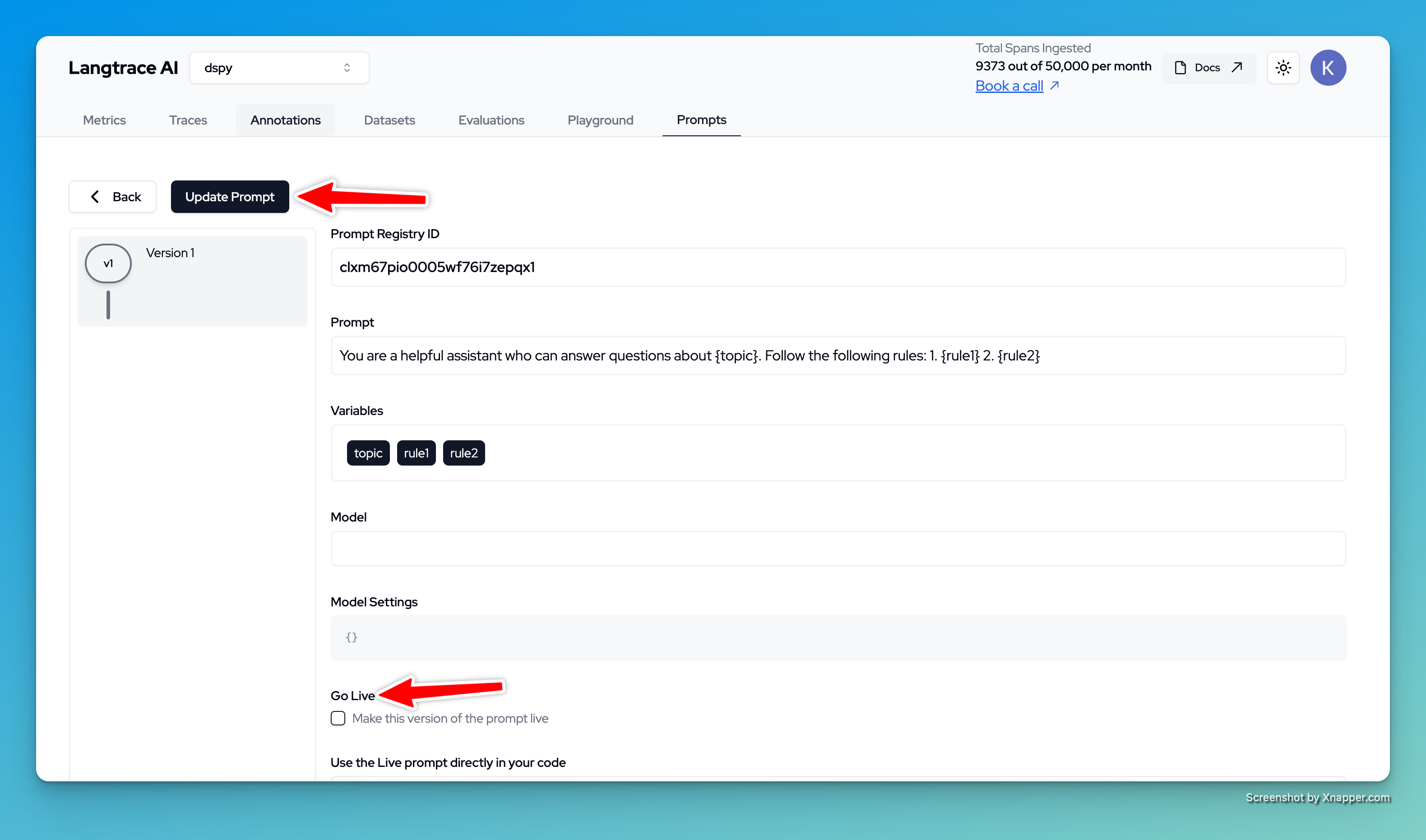
 Step 2: Once you have created a prompt, you can make it available by clicking the "Go Live" button. This will make the prompt available for use in your applications by default when you fetch it using the SDK. You can also create a new version of the prompt by clicking the "Update Prompt" button.
 Step 3: Use the prompt in your application by fetching it using the SDK. You can pass variables to the prompt to fill in the placeholders.
```python Python theme={null}
// Must precede any llm module imports
import json
from langtrace_python_sdk import get_prompt_from_registry
response = get_prompt_from_registry(, options={"prompt_version": 1, "variables": {"topic": "Healthcare", "rule1": "Be polite", "rule2": "If you do not know the answer, say I do not know. Do NOT make up stuff" } })
prompt = response['value']
# for json prompts (ex: tool calling)
# prompt = json.loads(prompt)
print(prompt)
```
```typescript Typescript theme={null}
# Must precede any llm module imports
import { getPromptFromRegistry } from '@langtrase/typescript-sdk'
const response = await getPromptFromRegistry(, options={"prompt_version": 1, "variables": {"topic": "Healthcare", "rule1": "Be polite", "rule2": "If you do not know the answer, say I do not know. Do NOT make up stuff" } })
prompt = response['value']
# for json prompts (ex: tool calling)
# prompt = json.loads(prompt)
print(prompt)
```
Step 4: You can also fetch a specific version of the prompt by passing the version number in the options. And you can get the "Prompt Registry ID" from the Langtrace UI.
That's it! You have successfully created and versioned a prompt in Langtrace. You can now use this prompt in your applications and easily manage and reuse it across your projects.
Step 3: Use the prompt in your application by fetching it using the SDK. You can pass variables to the prompt to fill in the placeholders.
```python Python theme={null}
// Must precede any llm module imports
import json
from langtrace_python_sdk import get_prompt_from_registry
response = get_prompt_from_registry(, options={"prompt_version": 1, "variables": {"topic": "Healthcare", "rule1": "Be polite", "rule2": "If you do not know the answer, say I do not know. Do NOT make up stuff" } })
prompt = response['value']
# for json prompts (ex: tool calling)
# prompt = json.loads(prompt)
print(prompt)
```
```typescript Typescript theme={null}
# Must precede any llm module imports
import { getPromptFromRegistry } from '@langtrase/typescript-sdk'
const response = await getPromptFromRegistry(, options={"prompt_version": 1, "variables": {"topic": "Healthcare", "rule1": "Be polite", "rule2": "If you do not know the answer, say I do not know. Do NOT make up stuff" } })
prompt = response['value']
# for json prompts (ex: tool calling)
# prompt = json.loads(prompt)
print(prompt)
```
Step 4: You can also fetch a specific version of the prompt by passing the version number in the options. And you can get the "Prompt Registry ID" from the Langtrace UI.
That's it! You have successfully created and versioned a prompt in Langtrace. You can now use this prompt in your applications and easily manage and reuse it across your projects.