> ## Documentation Index
> Fetch the complete documentation index at: https://docs.langtrace.ai/llms.txt
> Use this file to discover all available pages before exploring further.
# Graphlit
> Langtrace and Graphlit Integration Guide
Graphlit can accelerate your Generative AI app development by providing an API-first platform that offers intelligent text extraction, vector-based search, and RAG conversations, along with audio and video transcription support.
Langtrace integrates directly with Graphlit, providing comprehensive tracing and monitoring capabilities for your RAG (Retrieval-Augmented Generation) applications. Track everything from data ingestion to conversation completion with detailed performance metrics.
### Prerequisites
Before you begin, ensure you have the following:
* An active account on the [Graphlit Platform](https://portal.graphlit.dev/) with access to the API Settings page.
* An API key from Langtrace. Sign up for [Langtrace](https://langtrace.ai) if you haven't done so already.
## Setup
1. Install the Graphlit client and Langtrace's SDK and [initialize](/quickstart) the SDK in your code.
```bash Python theme={null}
# Install the SDK
pip install langtrace-python-sdk graphlit-client
```
2. Setup environment variables:
```bash Shell theme={null}
export LANGTRACE_API_KEY=YOUR_LANGTRACE_API_KEY
export GRAPHLIT_ORGANIZATION_ID=YOUR_GRAPHLIT_ORGANIZATION_ID
export GRAPHLIT_ENVIRONMENT_ID=YOUR_GRAPHLIT_ENVIRONMENT_ID
export GRAPHLIT_JWT_SECRET=YOUR_GRAPHLIT_JWT_SECRET
```
## Usage
Initialize Langtrace and Graphlit:
```python Python theme={null}
from langtrace_python_sdk import langtrace # Must precede other imports
from langtrace_python_sdk.utils.with_root_span import with_langtrace_root_span
from graphlit import Graphlit
from graphlit_api import input_types, enums
from openai import OpenAI
# Initialize Langtrace
langtrace.init()
# Initialize Graphlit and OpenAI clients
graphlit = Graphlit(
organization_id="YOUR_ORG_ID",
environment_id="YOUR_ENV_ID",
jwt_secret="YOUR_JWT_SECRET"
)
client = OpenAI()
```
Ingest content and create a specification:
```python Python theme={null}
@with_langtrace_root_span()
async def setup_rag():
# Ingest content
ingest_response = await graphlit.client.ingest_uri(
uri="https://example.com",
is_synchronous=True
)
content_id = ingest_response.ingest_uri.id
# Create specification
specification_input = input_types.SpecificationInput(
name="OpenAI GPT-4",
type=enums.SpecificationTypes.COMPLETION,
serviceType=enums.ModelServiceTypes.OPEN_AI,
openAI=input_types.OpenAIModelPropertiesInput(
model=enums.OpenAIModels.GPT4O_128K,
)
)
spec_response = await graphlit.client.create_specification(specification_input)
return spec_response.create_specification.id
```
Create and interact with a conversation:
```python Python theme={null}
@with_langtrace_root_span()
async def process_conversation(specification_id, prompt):
# Create conversation
conversation_input = input_types.ConversationInput(
name="RAG Conversation",
specification=input_types.EntityReferenceInput(
id=specification_id
)
)
conv_response = await graphlit.client.create_conversation(conversation_input)
conversation_id = conv_response.create_conversation.id
# Format conversation
format_response = await graphlit.client.format_conversation(
prompt,
conversation_id
)
formatted_message = format_response.format_conversation.message.message
# Generate completion using OpenAI
stream_response = client.chat.completions.create(
model="gpt-4",
messages=[{"role": "user", "content": formatted_message}],
temperature=0.1,
top_p=0.2,
stream=True
)
completion = ""
for chunk in stream_response:
if chunk.choices[0].delta.content:
completion += chunk.choices[0].delta.content
# Store completion
await graphlit.client.complete_conversation(
completion,
conversation_id
)
return completion
```
Run the complete RAG pipeline:
```python Python theme={null}
import asyncio
async def main():
try:
# Setup RAG environment
specification_id = await setup_rag()
# Process a question
response = await process_conversation(
specification_id,
"What are the key points from the document?"
)
print(response)
except Exception as e:
print(f"Error: {e}")
# Run the pipeline
asyncio.run(main())
```
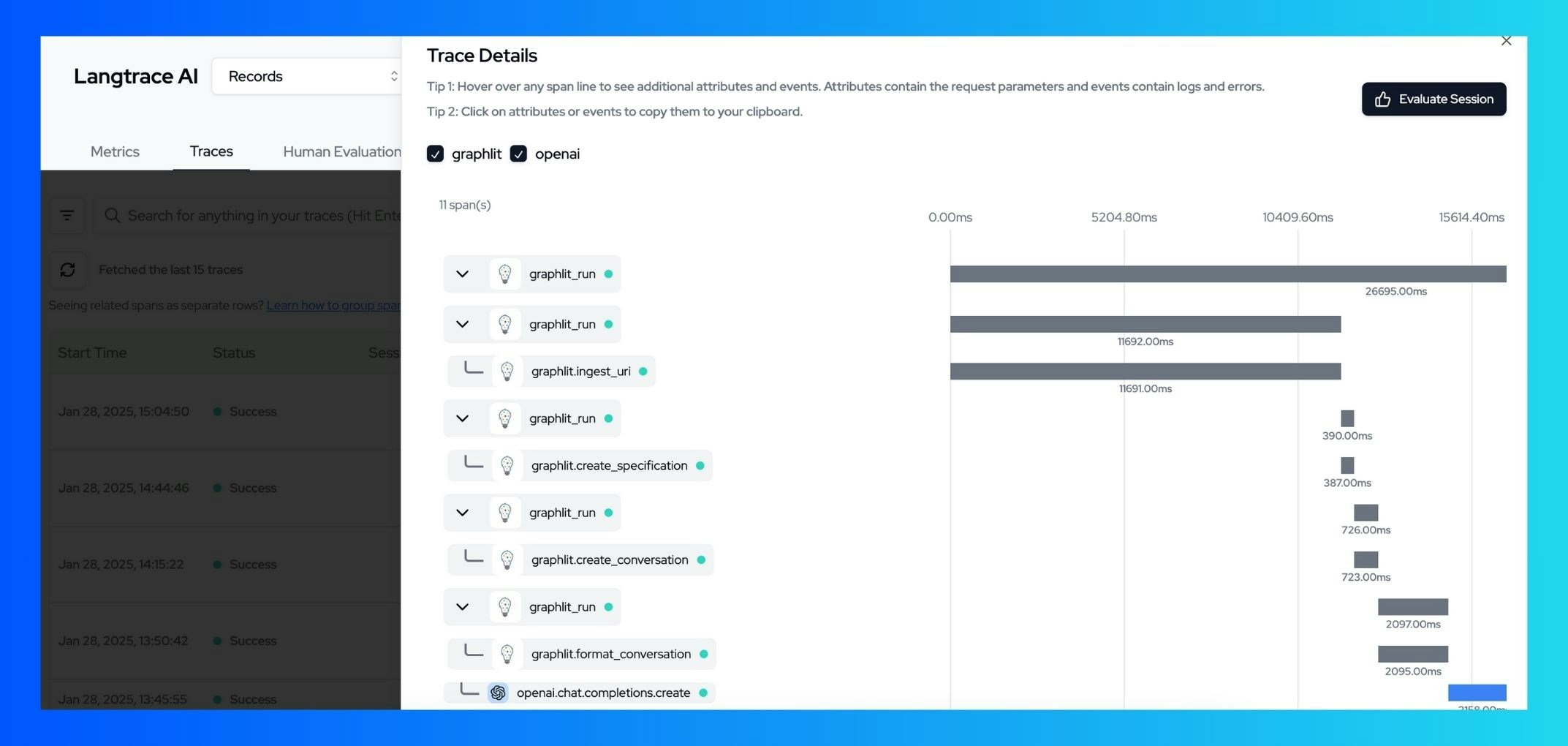
You can now view your traces on the Langtrace dashboard, including:
* Data ingestion metrics
* Specification creation details
* Conversation flow and completion times
* Error tracking and diagnostics
 ## Additional Resources
* [Langtrace Documentation](https://docs.langtrace.ai/introduction)
* [Graphlit Documentation](https://docs.graphlit.dev/)
## Additional Resources
* [Langtrace Documentation](https://docs.langtrace.ai/introduction)
* [Graphlit Documentation](https://docs.graphlit.dev/)