> ## Documentation Index
> Fetch the complete documentation index at: https://docs.langtrace.ai/llms.txt
> Use this file to discover all available pages before exploring further.
# Perplexity
> Perplexity is an advanced AI-powered search engine that provides instant, accurate answers to complex questions by analyzing vast amounts of information. Utilizing state-of-the-art natural language processing, it delivers precise results and insightful summaries, enhancing productivity and decision-making. Designed for both individuals and businesses, Perplexity simplifies information retrieval with its intuitive interface and powerful search capabilities.
Using Langtrace to monitor your Perplexity LLM apps is quick and easy. Follow these steps:
## Setup
1. Install the Langtrace and Perplexity SDKs.
*Note: You'll need API keys from Langtrace and Perplexity. Sign up for [Langtrace](https://langtrace.ai) and/or [Perplexity](https://perplexity.ai) if you haven't done so already.*
```bash Python theme={null}
# Install the SDK
pip install -U langtrace-python-sdk openai
```
2. Setup environment variables:
```bash Shell theme={null}
export LANGTRACE_API_KEY=YOUR_LANGTRACE_API_KEY
export PERPLEXITY_API_KEY=YOUR_PERPLEXITY_API_KEY
```
## Usage
Generate a simple output with your deployment's model:
```python Python theme={null}
import os
from langtrace_python_sdk import langtrace # Must precede any llm module imports
langtrace.init(api_key = os.environ['LANGTRACE_API_KEY'])
from openai import OpenAI
## NOTE that perplexity is open ai client compatible which is why we will use the OPEN AI client
# Generate a simple output with the Mistral 7b MODEL
messages = [
{
"role": "system",
"content": (
"You are an artificial intelligence assistant and you need to "
"engage in a helpful, detailed, polite conversation with a user."
),
},
{
"role": "user",
"content": (
"Count to 100, with a comma between each number and no newlines. "
"E.g., 1, 2, 3, ..."
),
},
]
client = OpenAI(api_key=os.environ['PPLX_API_KEY'], base_url="https://api.perplexity.ai")
response = client.chat.completions.create(
model="mistral-7b-instruct",
messages=messages,
)
```
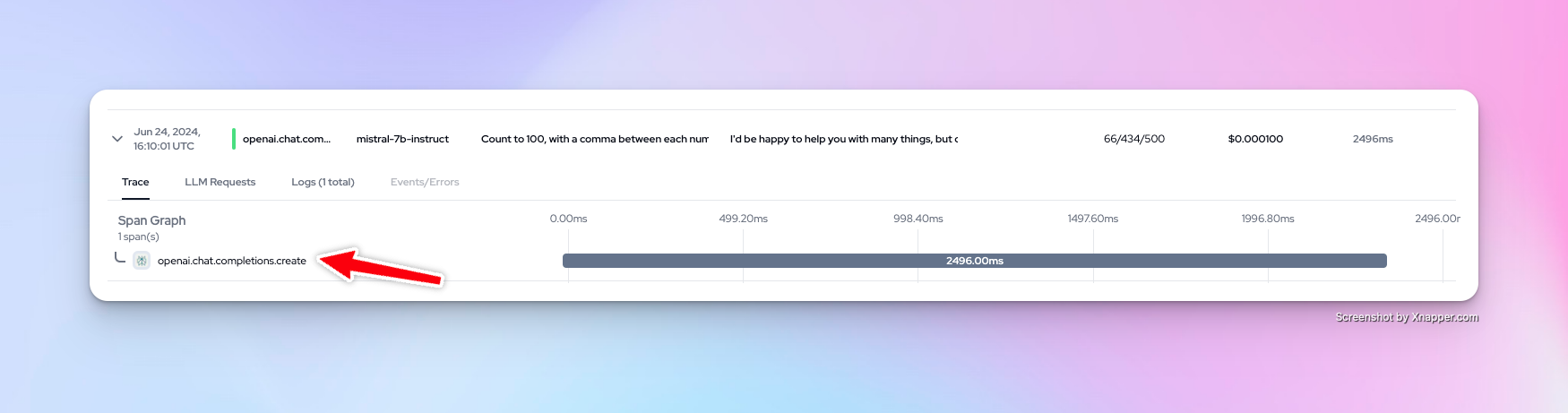
You can now view your traces on the Langtrace dashboard:
 Want to see more supported methods? Checkout the sample code in the [Langtrace Perplexity Python Example](https://github.com/Scale3-Labs/langtrace-recipes/blob/main/integrations/tools/perplexity/starter.ipynb) repository.