> ## Documentation Index
> Fetch the complete documentation index at: https://docs.langtrace.ai/llms.txt
> Use this file to discover all available pages before exploring further.
# Grouping Operations
> Langtrace SDK allows you to group related operations together using the `@with_langtrace_root_span` decorator for Python or `WithLangTraceRootSpan` for Typescript.
## What is a Root Span?
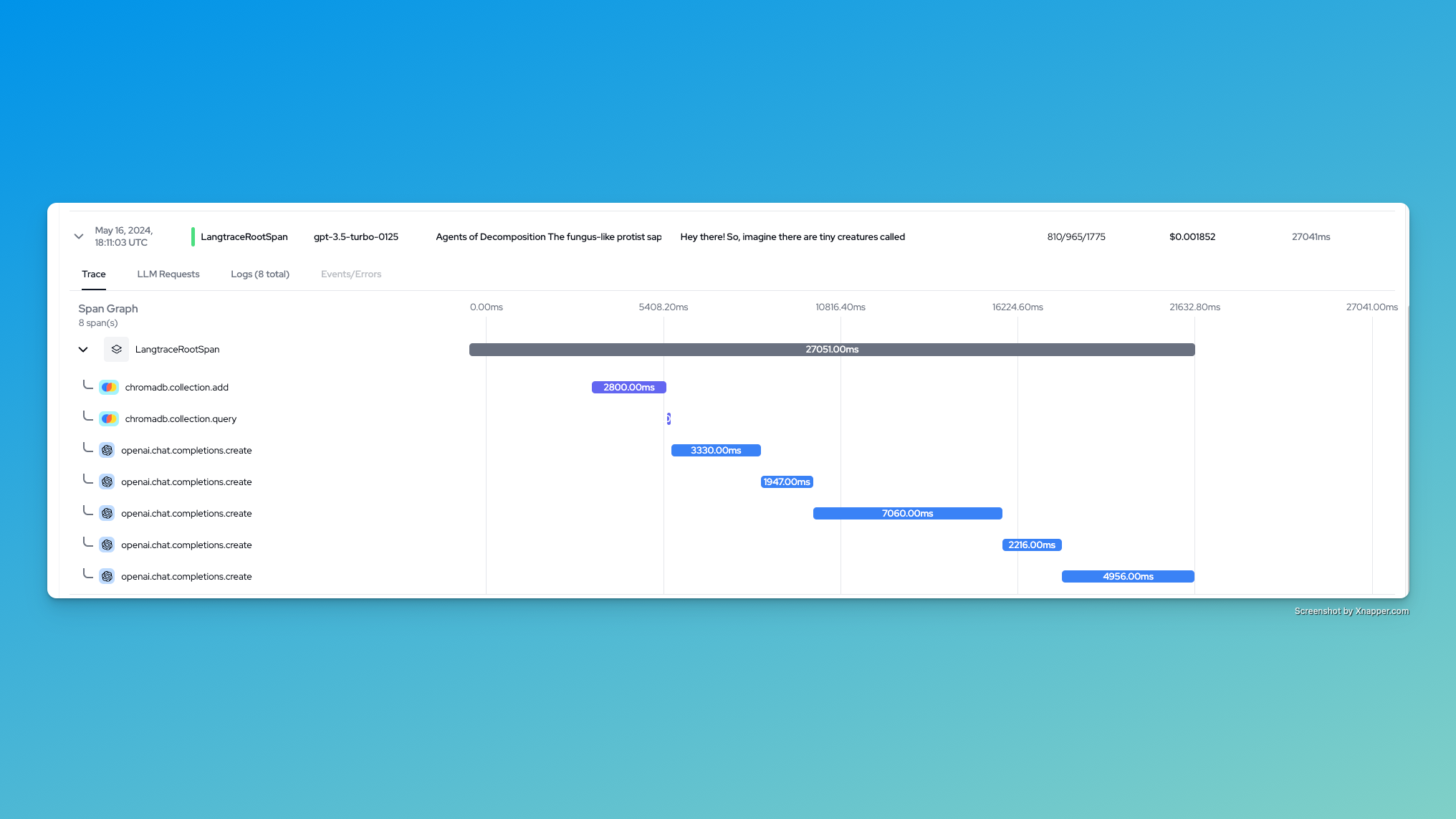
A root span is the top-level span in a trace that encompasses all related operations. It provides a hierarchical structure to your traces, making it easier to understand the relationship between different operations in your application.
 ## Benefits of Grouping Traces
* Improved Visibility: See the entire flow of operations in a single trace.
* Performance Analysis: Easily identify bottlenecks within a group of related operations.
* Debugging: Quickly pinpoint issues within a specific workflow.
* Context Preservation: Maintain context across multiple operations, making it easier to understand the full picture of your application's behavior.
## How to Group Traces
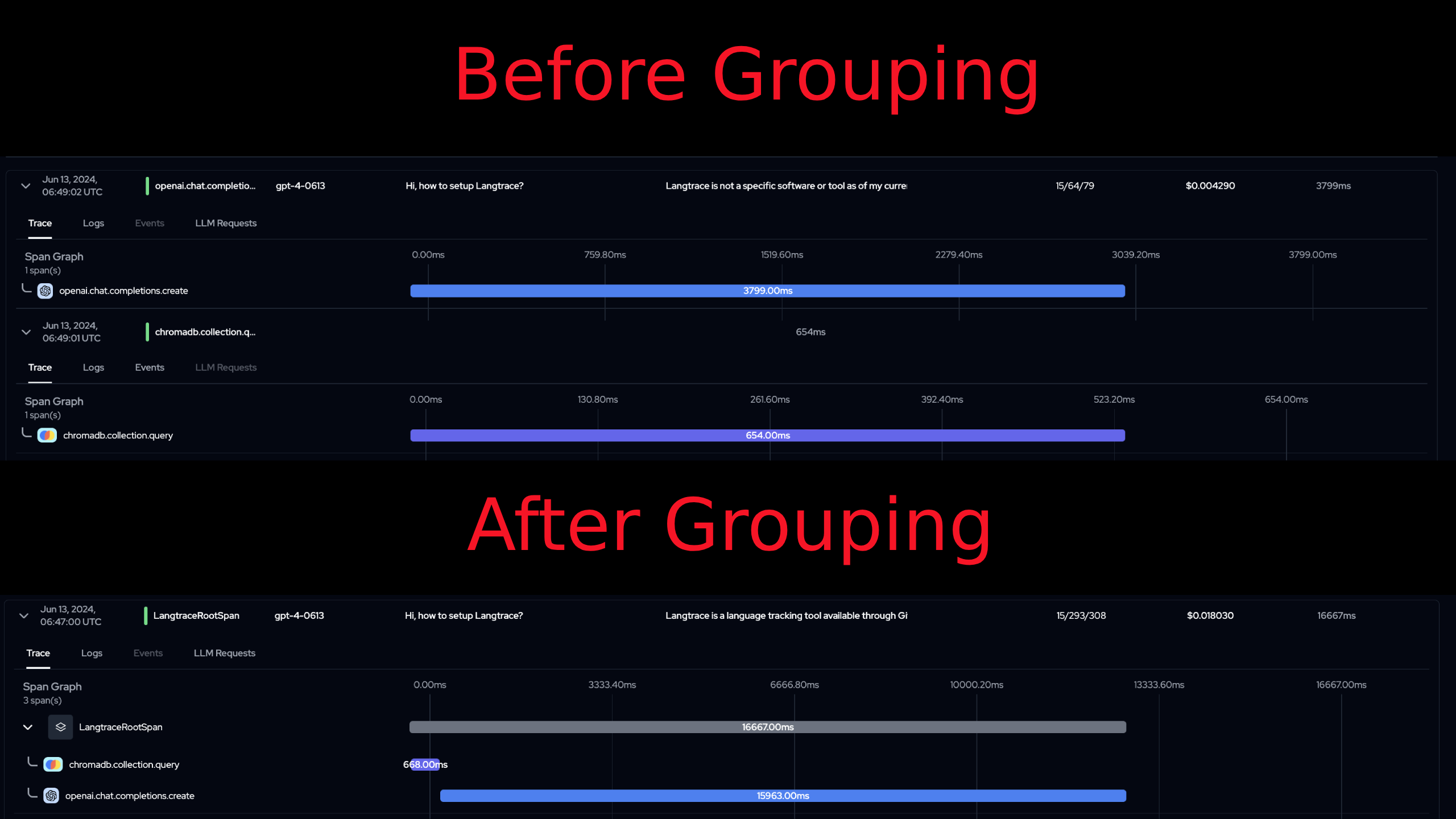
A typical application may have multiple operations that are related to each other. For example, in a RAG workflow, the user's input is embedded using a model, a semantic search is done on a VectorDB, and the results are again given back to the model to get a natural language response. In such cases, it is useful to group these operations together under a single root span. This allows you to see the entire flow of operations in a single trace.
### Installation
Step 1: Install and initialize Langtrace SDK. Refer to the [installation guide](/quickstart) for more information.
```typescript Typescript theme={null}
// Must precede any llm module imports
import * as Langtrace from "@langtrase/typescript-sdk";
Langtrace.init({ api_key: LANGTRACE_API_KEY });
```
```python Python theme={null}
# Must precede any llm module imports
from langtrace_python_sdk import langtrace
langtrace.init(api_key = '')
```
### Usage
Step 2: Use the `with_langtrace_root_span` decorator (Python) or `WithLangTraceRootSpan` (Typescript) function. Example below:
### Usage Examples
The following examples demonstrate how to group traces in a typical RAG (Retrieval-Augmented Generation) workflow:
1. Embed user input
2. Perform semantic search on a vector database
3. Generate a response using an LLM
### Examples
```typescript Typescript theme={null}
import * as Langtrace from "@langtrase/typescript-sdk";
export async function chatResponse(): Promise {
await Langtrace.withLangTraceRootSpan(async () => {
const client = new ChromaClient();
const collection = await client.getCollection({
name: "documentation",
embeddingFunction: embedder,
});
const results = await collection.query({
nResults: 2,
queryTexts: ["How to setup Langtrace?"],
});
const openaiclient = new OpenAI();
return openaiclient.chat.completions.create({
model: "gpt-4",
messages: [
{
role: "system",
content: `Respond in a natural language: ${results}`,
},
],
stream: false,
});
});
}
```
```python Python theme={null}
import chromadb
from langtrace_python_sdk import langtrace
from langtrace_python_sdk.utils.with_root_span import with_langtrace_root_span
from openai import OpenAI
langtrace.init()
@with_langtrace_root_span()
def example():
client = chromadb.HttpClient()
collection = client.get_collection("sample_collection")
results = collection.query(
query_texts=['How to setup Langtrace?'],
n_results=2,
)
openai_client = OpenAI()
response = openai_client.chat.completions.create(
model="gpt-4",
messages=[{"role": "user", "content": "Hi, how to setup Langtrace?"}],
stream=False,
)
print(response.choices[0].message.content)
example()
```
## Benefits of Grouping Traces
* Improved Visibility: See the entire flow of operations in a single trace.
* Performance Analysis: Easily identify bottlenecks within a group of related operations.
* Debugging: Quickly pinpoint issues within a specific workflow.
* Context Preservation: Maintain context across multiple operations, making it easier to understand the full picture of your application's behavior.
## How to Group Traces
A typical application may have multiple operations that are related to each other. For example, in a RAG workflow, the user's input is embedded using a model, a semantic search is done on a VectorDB, and the results are again given back to the model to get a natural language response. In such cases, it is useful to group these operations together under a single root span. This allows you to see the entire flow of operations in a single trace.
### Installation
Step 1: Install and initialize Langtrace SDK. Refer to the [installation guide](/quickstart) for more information.
```typescript Typescript theme={null}
// Must precede any llm module imports
import * as Langtrace from "@langtrase/typescript-sdk";
Langtrace.init({ api_key: LANGTRACE_API_KEY });
```
```python Python theme={null}
# Must precede any llm module imports
from langtrace_python_sdk import langtrace
langtrace.init(api_key = '')
```
### Usage
Step 2: Use the `with_langtrace_root_span` decorator (Python) or `WithLangTraceRootSpan` (Typescript) function. Example below:
### Usage Examples
The following examples demonstrate how to group traces in a typical RAG (Retrieval-Augmented Generation) workflow:
1. Embed user input
2. Perform semantic search on a vector database
3. Generate a response using an LLM
### Examples
```typescript Typescript theme={null}
import * as Langtrace from "@langtrase/typescript-sdk";
export async function chatResponse(): Promise {
await Langtrace.withLangTraceRootSpan(async () => {
const client = new ChromaClient();
const collection = await client.getCollection({
name: "documentation",
embeddingFunction: embedder,
});
const results = await collection.query({
nResults: 2,
queryTexts: ["How to setup Langtrace?"],
});
const openaiclient = new OpenAI();
return openaiclient.chat.completions.create({
model: "gpt-4",
messages: [
{
role: "system",
content: `Respond in a natural language: ${results}`,
},
],
stream: false,
});
});
}
```
```python Python theme={null}
import chromadb
from langtrace_python_sdk import langtrace
from langtrace_python_sdk.utils.with_root_span import with_langtrace_root_span
from openai import OpenAI
langtrace.init()
@with_langtrace_root_span()
def example():
client = chromadb.HttpClient()
collection = client.get_collection("sample_collection")
results = collection.query(
query_texts=['How to setup Langtrace?'],
n_results=2,
)
openai_client = OpenAI()
response = openai_client.chat.completions.create(
model="gpt-4",
messages=[{"role": "user", "content": "Hi, how to setup Langtrace?"}],
stream=False,
)
print(response.choices[0].message.content)
example()
```
 ## Best Practices for Grouping Traces
1. Group Logically: Create root spans around logical units of work or user-facing operations.
2. Keep it Simple: Avoid creating overly complex hierarchies of spans.
3. Use Consistent Naming: Adopt a consistent naming convention for your root spans to make analysis easier.
4. Add Context: Use attributes to add relevant context to your root spans.
5. Balance Detail and Overview: Strive for a balance between providing detailed traces and maintaining a clear high-level view of your application's behavior.
## Troubleshooting
If you're not seeing grouped traces as expected:
1. Verify that Langtrace is properly initialized before any LLM module imports.
2. Ensure that all relevant operations are within the scope of the `withLangTraceRootSpan` function or `@with_langtrace_root_span` decorator.
3. Check that your API key is correct and that you have the necessary permissions.
4. If using asynchronous operations, make sure they're properly awaited within the root span scope.
## Best Practices for Grouping Traces
1. Group Logically: Create root spans around logical units of work or user-facing operations.
2. Keep it Simple: Avoid creating overly complex hierarchies of spans.
3. Use Consistent Naming: Adopt a consistent naming convention for your root spans to make analysis easier.
4. Add Context: Use attributes to add relevant context to your root spans.
5. Balance Detail and Overview: Strive for a balance between providing detailed traces and maintaining a clear high-level view of your application's behavior.
## Troubleshooting
If you're not seeing grouped traces as expected:
1. Verify that Langtrace is properly initialized before any LLM module imports.
2. Ensure that all relevant operations are within the scope of the `withLangTraceRootSpan` function or `@with_langtrace_root_span` decorator.
3. Check that your API key is correct and that you have the necessary permissions.
4. If using asynchronous operations, make sure they're properly awaited within the root span scope.